Skip to content

To link PayNow with your bank account in Singapore, you register an eligible identifier, usually your mobile number or NRIC/FIN, with a participating bank and select the account where you want to receive PayNow transfers. Registration normally takes place through your bank’s mobile banking app or internet banking service.
PayNow does not require you to create a separate bank account. Instead, it connects an eligible identifier to an existing Singapore bank account. Once registered, people sending money to your PayNow identifier do not need your full bank account number. PayNow supports instant SGD transfers through FAST between participating banks and major payment institutions.
If you are preparing PayNow for online payments, our PayNow Casino Singapore guide explains how the payment method fits into deposits, withdrawals, transaction checks, and other common payment situations.
Quick Answer
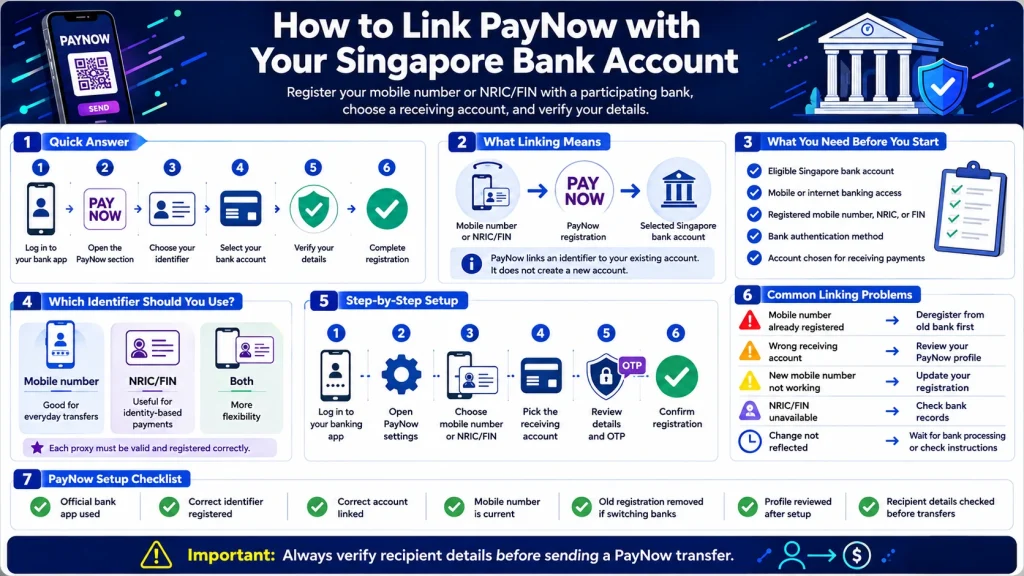
To link PayNow to a bank account, log in to your participating bank’s mobile app or internet banking platform, open the PayNow registration section, choose your mobile number or NRIC/FIN, select the bank account you want to connect, verify the information, and complete registration.
The Association of Banks in Singapore states that linking your mobile number and/or NRIC/FIN to your bank account is a one-time registration process. An SMS verification process might also be required, depending on your bank.
What Does Linking PayNow to a Bank Account Mean?
When you connect PayNow to a bank account, you are registering an identifier that directs incoming PayNow payments to a chosen account.
For individual bank customers, common PayNow identifiers include:
- Mobile number
- Singapore NRIC
- FIN
PayNow also supports UENs for entities and Virtual Payment Addresses for certain payment institution users.
For example, if you link your Singapore mobile number to your savings account, someone sending money through PayNow to your registered mobile number directs the transfer to that linked account.
Your bank account number does not become your PayNow identifier.
What Do You Need Before Registering PayNow?
Before starting your PayNow bank account setup, check that you have access to a participating Singapore bank or eligible payment institution.
For most individual bank customers, you will need:
- An eligible Singapore bank account
- Access to mobile or internet banking
- Your bank-registered mobile number, NRIC, or FIN
- Access to any authentication method requested by your bank
- An account you want to use for receiving PayNow payments
The exact screens and authentication process differ between banks, but the underlying registration process follows the same principle.
How to Link PayNow to Your Bank Account
The exact menu names depend on your bank, but you generally follow these steps.
Step 1: Log In to Your Banking App
Open your bank’s official mobile banking app or internet banking service and sign in.
Do not register PayNow through links received from unknown messages, advertisements, or unofficial websites. Start from your bank’s official app or website.
Step 2: Open the PayNow Section
Find PayNow within your bank’s payment, transfer, or account services.
The location differs by bank. For example, DBS places PayNow registration within its PayNow profile, while OCBC provides PayNow management within its digital banking settings and PayNow management functions.
Step 3: Choose Your PayNow Identifier
Choose the identifier you want to register.
For most personal bank accounts, this will be your:
- Mobile number
- NRIC/FIN
You should check which option suits how you want to receive payments.
Step 4: Select the Bank Account to Link
Choose the account where incoming PayNow payments should be credited.
This step is important if you have several accounts with the same bank. Check the selected account carefully before completing registration.
DBS, for example, asks customers to select the account they want to link when registering their mobile number or NRIC/FIN for PayNow.
Step 5: Verify Your Details
Review the registered identifier and selected bank account.
Depending on your bank, you might need an OTP or another bank authentication method to complete the registration. The ABS PayNow fact sheet states that SMS OTP verification might be required during registration.
Step 6: Complete the Registration
Submit the registration and check that your PayNow profile shows the correct linked account.
Once the registration is active, eligible PayNow transfers sent to your registered identifier should be directed to the selected account.
PayNow Registration Examples for Singapore Banks
| Bank | Registration Method | Identifier Options | Account Selection |
|---|---|---|---|
| DBS/POSB | digibank mobile or online | Mobile number, NRIC/FIN | Select eligible account |
| OCBC | OCBC app or online banking | Mobile number, NRIC/FIN | Select receiving account |
| UOB | UOB TMRW or internet banking | Mobile number, NRIC/FIN | Link to eligible account |
DBS states that customers can register a mobile number or NRIC/FIN through digibank and choose the account they want to link. OCBC provides PayNow registration and account selection through digital banking. UOB also supports registration of a mobile number and/or NRIC/FIN through UOB TMRW or Personal Internet Banking.
Should You Link Your Mobile Number or NRIC/FIN to PayNow?
Both options serve as identifiers for receiving PayNow transfers, but they might be useful in different situations.
| Identifier | Useful For | Key Point |
|---|---|---|
| Mobile number | Everyday person-to-person transfers | Easy for people who already know your number |
| NRIC/FIN | Payments tied to your identity | Does not depend on sharing your mobile number |
| Both | Wider flexibility | Each proxy needs valid registration |
You do not need to share your bank account number when someone sends you money through a registered PayNow identifier.
For everyday transfers, a mobile number is often convenient. For some official payouts, an NRIC-linked PayNow registration is used instead. UOB, for example, states that NRIC registration is required for certain government payments through PayNow.
Can the Same Mobile Number Be Linked to Two Banks?
No. The same PayNow proxy should not be registered with two banks simultaneously.
DBS states that if your mobile number or NRIC/FIN is already registered as a PayNow proxy with another bank, you first need to deregister it from the existing bank before registering it with DBS/POSB.
This becomes important when switching banks.
For example:
Current setup:
Mobile number → Bank A
Desired setup:
Mobile number → Bank B
You generally need to remove the existing Bank A registration before registering the same mobile number with Bank B.
How to Change the Bank Account Linked to PayNow
If you want to receive PayNow transfers through another account, start by checking whether the new account belongs to the same bank or a different bank.
Changing Accounts Within the Same Bank
Your banking app might offer a PayNow management function where you update the account linked to your identifier.
The exact process depends on your bank.
Check the PayNow profile or PayNow management section and review the receiving account before making changes.
Moving PayNow to Another Bank
If you want to connect PayNow to a bank account at another bank, you generally need to deregister the existing proxy before registering it with the new institution.
Do not assume opening a new bank account automatically moves your PayNow registration. Check the existing proxy registration first.
What Happens If You Change Your Mobile Number?
If you change your mobile number, update your PayNow registration as well.
The ABS PayNow fact sheet states that customers should report mobile number changes to their bank or payment institution. The old number should be delinked, followed by registration of the new number. If the new number is not registered, you will not receive PayNow payments through it.
This is especially important before expecting a payment or using PayNow-linked payment services.
How to Check If Your PayNow Account Is Linked Correctly
After registration, check your PayNow profile through your banking app.
Confirm:
- Your registered mobile number or NRIC/FIN
- Your linked receiving account
- Your bank account is active
- Your personal details are current
- Any registration change has been completed
If you recently switched banks or mobile numbers, check your profile before receiving a large transfer.
A small test transfer between accounts under your control, where supported, also helps confirm which account currently receives payments.
Does Linking PayNow Automatically Allow Casino Deposits?
No. Registering PayNow with your bank account and making a payment to an online platform are separate actions.
PayNow registration determines how your identifier connects with your bank account. A deposit still requires you to follow the payment instructions provided for the transaction.
Before sending a payment, verify the recipient details displayed by your bank. PayNow requires users to review recipient information before confirming a transfer.
For the deposit process, see How to Deposit Using PayNow at an Online Casino.
What Should You Check Before Sending a PayNow Payment?
Linking PayNow correctly does not remove the need to check each transaction.
Before confirming a transfer:
- Check the recipient information.
- Check the payment amount.
- Confirm you are using the intended bank account.
- Review any transaction reference.
- Do not share OTPs or banking passwords.
- Keep a record of the completed transfer.
ABS instructs users to verify the recipient before confirming a PayNow transfer.
This becomes especially important because completed instant transfers might be difficult to correct after money reaches the wrong recipient.
If you send a payment to the wrong gaming account, see What to Do If You Sent Money to the Wrong Casino Account.
Common PayNow Linking Problems
| Problem | Possible Reason | What to Check |
|---|---|---|
| Mobile number already registered | Proxy linked to another bank | Check existing PayNow registration |
| Wrong receiving account | Another account selected | Review PayNow profile |
| Cannot register mobile number | Bank records differ | Check registered personal details |
| New mobile number not working | Old number still linked | Update PayNow registration |
| NRIC/FIN unavailable | Bank records need updating | Contact your bank |
| Registration change not reflected | Bank security process still active | Check bank instructions |
For example, DBS notes that a recycled mobile number might already have a PayNow registration belonging to its previous owner. In this situation, the bank asks customers to contact it for assistance.
PayNow Bank Account Setup Checklist
| Check | Completed? |
|---|---|
| Banking app is from the official bank | Yes / No |
| Correct PayNow identifier registered | Yes / No |
| Correct receiving account linked | Yes / No |
| Mobile number is current | Yes / No |
| NRIC/FIN details are current | Yes / No |
| Old bank registration removed if switching banks | Yes / No |
| PayNow profile reviewed after setup | Yes / No |
| Recipient details checked before transfers | Yes / No |
If you plan to use PayNow with an online gaming platform, also check the platform itself before depositing. Our How to Verify a PayNow Casino Before Depositing guide covers payment information, platform checks, and warning signs to review first.
Frequently Asked Questions
How do I link PayNow to my bank account?
Log in to your bank’s mobile app or internet banking service, find PayNow registration, choose your mobile number or NRIC/FIN, select the receiving bank account, verify the information, and complete registration. Exact menu names differ between banks.
Do I need a separate account for PayNow?
No. PayNow links an eligible identifier to an existing participating bank or payment institution account. It does not require a separate PayNow bank account.
Can I link my mobile number to PayNow?
Yes. Individual users at participating institutions can register an eligible mobile number as their PayNow identifier. Your bank then links the number to the receiving account you select.
Can I link the same mobile number to two different banks?
A PayNow proxy such as the same mobile number should not be registered to two banks at the same time. If moving it to another bank, deregister it from the existing institution before registering it with the new one.
What should I do if my PayNow mobile number is already registered?
Check whether you previously linked it to another bank. If you do not recognize the registration, contact your bank. A recycled mobile number might also retain an earlier registration associated with its previous owner.