Skip to content

Payment speed is one of the most important factors when choosing an online casino payment method. While most deposits are completed quickly, the overall experience depends on both the payment provider and how the gaming platform processes transactions.
Singapore players commonly choose between PayNow, e-wallets, credit cards, and bank transfers. Each method has different processing times, verification requirements, and withdrawal procedures.
If you’re looking for the fastest casino payment method in Singapore, this guide compares the most common options and explains what affects payment speed.
Related Guide: Read our PayNow Casino Singapore guide to learn how PayNow works for online casino payments.
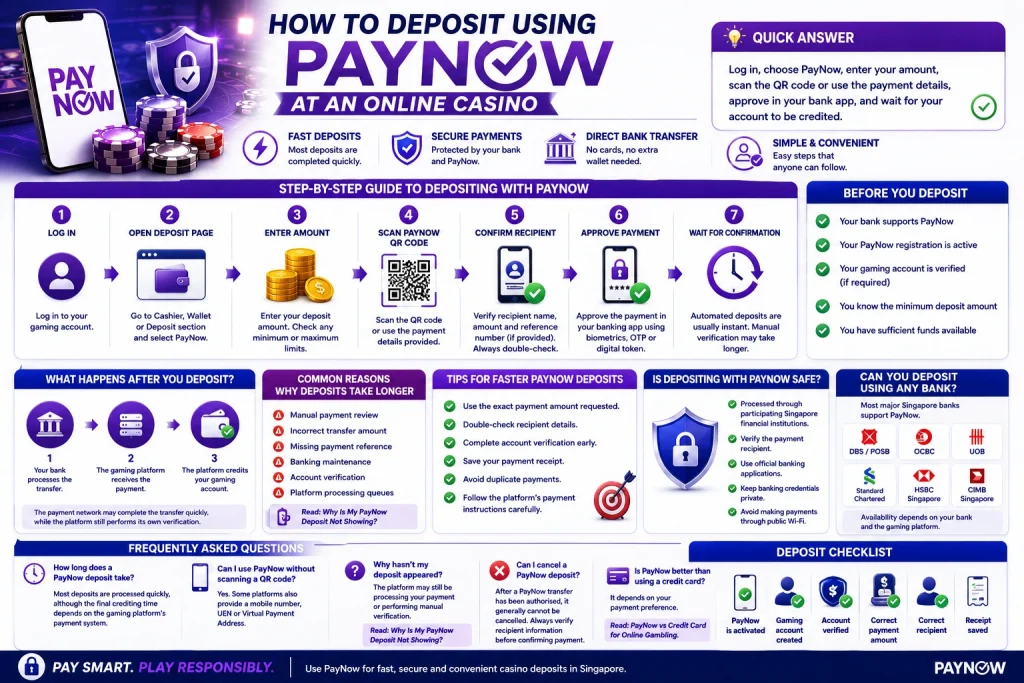
Quick Answer
To deposit using PayNow, simply:
- Log in to your gaming account.
- Select PayNow as your payment method.
- Enter your deposit amount.
- Scan the QR code or use the provided payment details.
- Approve the payment through your Singapore banking app.
- Wait for the platform to credit your account.
Most PayNow deposits are completed quickly, although the final crediting time depends on whether the platform uses automated or manual payment processing.
What Is a PayNow Deposit?
A PayNow deposit is a bank transfer made using Singapore’s PayNow payment system.
Instead of entering card details, players transfer funds directly from a participating Singapore bank account using:
- PayNow QR
- Mobile number
- NRIC/FIN
- Virtual Payment Address (VPA)
- Unique Entity Number (UEN)
Because payments are made through your existing banking application, there is no need to create an additional wallet account.
Related Guide: Learn more in What Is PayNow and How Does It Work for Online Payments?
Before You Deposit
Before making your first PayNow deposit, check the following:
- Your bank supports PayNow.
- Your PayNow registration is active.
- Your gaming account is verified (if required).
- You know the minimum deposit amount.
- You have sufficient funds available.
Preparing these details beforehand helps reduce payment interruptions.
Step-by-Step Guide to Depositing with PayNow
Step 1: Log In to Your Gaming Account
Sign in using your registered username and password.
If you have not created an account yet, complete the registration process first.
Step 2: Open the Deposit Page
Navigate to the Cashier, Wallet, or Deposit section.
Select PayNow from the available payment methods.
Step 3: Enter Your Deposit Amount
Input the amount you wish to transfer.
Some platforms have:
- Minimum deposit limits
- Maximum deposit limits
- Promotional qualifying amounts
Always review these before continuing.
Step 4: Scan the PayNow QR Code
The platform may display:
- A PayNow QR code
- Mobile number
- UEN
- Virtual Payment Address
Open your banking application and complete the payment using the displayed information.
Step 5: Confirm the Recipient
Before approving the payment, always verify:
- Recipient name
- Deposit amount
- Reference number (if provided)
Never transfer funds without confirming the recipient details.
Step 6: Approve the Payment
Authorise the transfer using your banking application’s security process.
Depending on your bank, this may include:
- Biometrics
- Digital Token
- One-Time Password (OTP)
Step 7: Wait for Confirmation
After payment is completed:
- Automated systems may credit your account shortly.
- Manual processing may require additional verification.
If your balance has not updated after the stated processing time, contact customer support with your payment reference.
Related Guide: Read Instant PayNow Deposits vs Manual Transfers.
What Happens After You Make a Deposit?
A PayNow payment normally goes through three stages:
- Your bank processes the transfer.
- The gaming platform receives the payment.
- The platform credits your gaming account.
The payment network may complete the transfer quickly, while the platform still performs its own verification.
Common Reasons Why Deposits Take Longer
Payment delays may occur because of:
- Manual payment review
- Incorrect transfer amount
- Missing payment reference
- Banking maintenance
- Account verification
- Platform processing queues
Related Guide: Read Why Is My PayNow Deposit Not Showing?
Tips for Faster PayNow Deposits
To improve the deposit experience:
- Use the exact payment amount requested.
- Double-check recipient details.
- Complete account verification early.
- Save your payment receipt.
- Avoid duplicate payments.
- Follow the platform’s payment instructions carefully.
These simple steps help reduce manual verification.
Is Depositing with PayNow Safe?
PayNow transfers are processed through participating Singapore financial institutions.
However, players should also:
- Verify the payment recipient.
- Use official banking applications.
- Keep banking credentials private.
- Avoid making payments through public Wi-Fi.
Related Guide: Learn more in Is PayNow Safe for Online Casino Transactions?
Can You Deposit Using Any Bank?
Most major Singapore banks support PayNow, including:
- DBS / POSB
- OCBC
- UOB
- Standard Chartered
- HSBC Singapore
- CIMB Singapore
Availability depends on both your bank and the gaming platform.
Deposit Checklist
| Before Depositing | |
|---|---|
| PayNow is activated | ✓ |
| Gaming account created | ✓ |
| Account verified | ✓ |
| Correct payment amount | ✓ |
| Correct recipient | ✓ |
| Receipt saved | ✓ |
Frequently Asked Questions
How long does a PayNow deposit take?
Most are processed shortly after payment confirmation. Actual processing time depends on the platform’s payment system.
Can I use PayNow without scanning a QR code?
Yes. Some platforms also provide a mobile number, UEN, or Virtual Payment Address.
Why hasn't my deposit appeared?
The platform may still be processing your payment or performing manual verification.
Can I cancel a PayNow deposit?
After a PayNow transfer has been authorised, it generally cannot be cancelled. Always verify recipient information before confirming payment.
Is PayNow better than using a credit card?
It depends on your payment preference.