Skip to content

A PayNow payment doesn’t always go through, even when your balance is sufficient and the recipient details look correct.
Banks and payment providers apply transaction limits, fraud controls, account checks and other security measures to electronic transfers. As a result, a PayNow casino transaction may be rejected, delayed or held for review before it reaches the recipient.
That doesn’t necessarily mean PayNow itself has stopped working. The issue may come from your bank, the recipient account, your transaction settings or the receiving platform.
For a broader overview of deposits, withdrawals and PayNow payments, read our PayNow Casino Singapore guide.
Quick Answer
Yes, a bank may stop, reject or hold a PayNow transfer in certain situations.
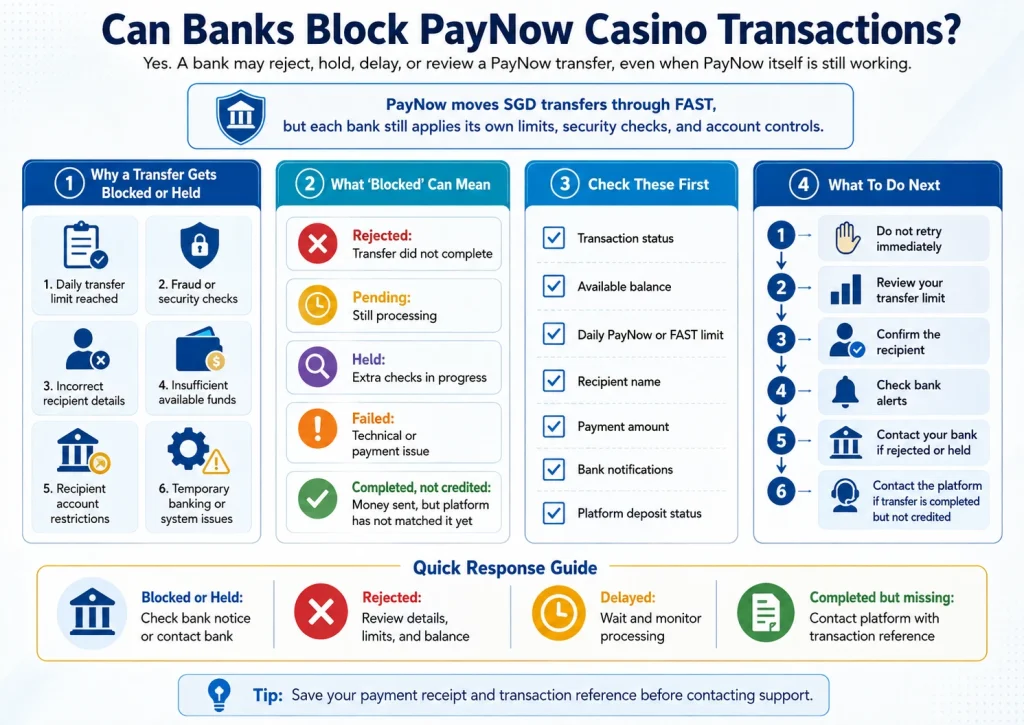
Common reasons include:
- Daily transfer limits
- Insufficient available funds
- Fraud or security checks
- Incorrect recipient information
- Recipient account restrictions
- Temporary banking system issues
- Unusual transaction activity
PayNow itself transfers Singapore dollar funds between participating banks and major payment institutions through FAST. Individual banks still apply their own account controls and security measures to transactions.
What Does “Blocked” Actually Mean?
| Payment Status | What It Usually Means |
|---|---|
| Rejected | The transfer was not completed |
| Pending | The bank or platform is still processing it |
| Held | Additional checks may be taking place |
| Failed | A technical or payment issue stopped the transfer |
| Completed but not credited | Funds left your bank, but the platform has not matched them yet |
The first step is to check the exact status shown inside your banking app.
If your payment was rejected rather than blocked, read Why Was My PayNow Payment Rejected?
Why Banks May Stop a PayNow Transaction
Banks monitor electronic transfers to protect customers and comply with their own security requirements.
A transaction may be interrupted for several reasons.
Your Transfer Limit Has Been Reached
Banks let customers set daily limits for transfers, including PayNow.
For example, OCBC states that daily transaction limits apply across services such as PayNow and FAST. Once the configured limit is reached, further transactions may not proceed until the limit resets or is changed.
Check your banking app before assuming the recipient has been blocked.
The Bank Detects Unusual Activity
Banks use fraud-monitoring systems to identify transactions that differ from normal account behaviour.
In some cases, a transaction may be held while additional checks take place. UOB, for example, states that its enhanced fraud surveillance measures may hold certain transactions for at least 24 hours where its safeguards apply.
A security hold does not automatically mean the recipient itself is prohibited.
The Recipient Details Are Incorrect
PayNow relies on registered identifiers such as mobile numbers, NRIC/FIN, UENs and Virtual Payment Addresses.
If the information is wrong, inactive or no longer connected to the expected recipient, the transfer may fail.
Always check the recipient name displayed in your banking app before approving the transaction.
There Are Not Enough Available Funds
A transfer may fail if the available balance does not cover the payment.
The amount shown in your account may also differ from your available balance if other transactions are pending.
The Recipient Account Has an Issue
The problem may sit on the receiving side.
A recipient account might have been closed, restricted or removed from PayNow registration. This can stop a transfer even when your own account is working normally.
Does PayNow Automatically Block Casino Payments?
There is an important distinction here.
PayNow is a funds-transfer service. It is not the same thing as the bank’s transaction monitoring system.
The Association of Banks in Singapore describes PayNow as a service that moves Singapore dollar funds between participating banks and major payment institutions through FAST.
Whether a specific transfer proceeds still depends on the participating financial institutions, account status and transaction controls involved.
For this reason, a failed casino-related transfer should not automatically be interpreted as a blanket PayNow block.
Could a Bank Restrict Certain Transactions?
Banks apply their own terms, security systems and risk controls to customer accounts.
That means a bank may decline or hold a transaction based on its own systems even when PayNow itself is operational.
The exact reason is not always visible to the customer. If your banking app only shows a generic rejection message, contacting the bank is the clearest way to identify whether the issue involves:
- Your account
- Your transfer limit
- The recipient
- A security review
- A technical problem
Avoid repeatedly resending the same payment until you know why the first attempt failed.
PayNow Limits Can Look Like a Block
One common mistake is assuming a failed transaction means the bank has blocked the merchant.
In practice, your PayNow or transfer limit may simply be too low.
For example:
You attempt to send SGD500.
Your remaining daily transfer allowance is SGD300.
The transaction fails.
Nothing is necessarily wrong with the recipient. Your transaction limit simply prevents the transfer.
Check your bank’s transfer settings before taking further action.
What Should You Check First?
| Check | What to Look For |
|---|---|
| Transaction status | Failed, rejected, pending or completed |
| Available balance | Enough funds for the transfer |
| Daily transfer limit | Remaining PayNow/FAST allowance |
| Recipient name | Matches the expected recipient |
| Payment amount | Matches the platform instructions |
| Bank notification | Any fraud or security message |
| Platform status | Deposit method still active |
What to Do If Your PayNow Casino Payment Is Blocked
Step 1: Do Not Retry Immediately
Repeated payments may create duplicate transfers if the original transaction is only delayed.
Check its status first.
Step 2: Review Your Transfer Limits
Open your banking app and confirm that the transaction does not exceed your daily PayNow or FAST limit.
Step 3: Check the Recipient
Confirm the PayNow recipient name before sending funds.
If the recipient differs from what the platform told you to expect, stop the payment and verify the instructions.
Step 4: Review Bank Notifications
Your bank may send a message if a transaction requires additional authentication or has been held for security reasons.
Step 5: Contact Your Bank
If the bank rejected or held the transaction and the reason is unclear, contact your bank using its official support channel.
Ask whether the issue relates to:
- Your account
- Transfer limits
- Security checks
- The recipient
- PayNow availability
Step 6: Contact the Platform
If the bank confirms the transfer completed successfully but your casino account has not been credited, contact the platform instead.
Provide the transaction reference rather than making another transfer.
How to Reduce PayNow Payment Problems
A few basic checks prevent many failed transfers.
Before approving a payment:
- Confirm the recipient name
- Check your transfer limit
- Enter the exact requested amount
- Use the current payment details
- Save the transaction reference
- Avoid duplicate transfers
- Complete account verification where required
For a full payment walkthrough, read How to Deposit Using PayNow at an Online Casino.
Security Checks Are Different From Payment Restrictions
A transaction held for fraud review is not the same as a permanently blocked payment method.
Banks increasingly use real-time fraud monitoring to protect customers. UOB publicly describes enhanced fraud surveillance that may temporarily hold certain transactions under its security controls.
This type of check focuses on transaction risk rather than whether PayNow itself is functioning.
For more security guidance, read How to Keep Your PayNow Casino Transactions Secure.
PayNow Casino Blocked vs Rejected vs Delayed
| Problem | Likely Next Step |
|---|---|
| Blocked/Held | Check bank notification or contact bank |
| Rejected | Review details, limits and available balance |
| Delayed | Check whether bank or casino is still processing |
| Completed but missing | Contact platform with transaction reference |
Identifying the status first saves time and reduces the risk of duplicate payments.
Frequently Asked Questions
Can my bank block a PayNow casino transaction?
A bank may reject, hold or restrict a PayNow transfer based on account settings, transaction limits, fraud monitoring or other internal controls. The exact reason depends on the bank and transaction.
Does a failed PayNow payment mean the casino is blocked?
No. A failed transaction may result from limits, incorrect recipient information, security checks, insufficient funds or technical issues.
Why does my bank say “unable to transfer”?
The message may relate to your transfer limit, recipient registration, account status, security checks or a technical problem. Check your banking app and contact your bank if the reason remains unclear.
Should I try another PayNow account if the payment fails?
First identify why the original payment failed. Switching accounts without knowing the cause may create additional issues.
What if money left my account but the casino says it hasn't arrived?
Keep the transaction reference and payment confirmation. Contact the platform after the stated processing period rather than sending the payment again.