Skip to content
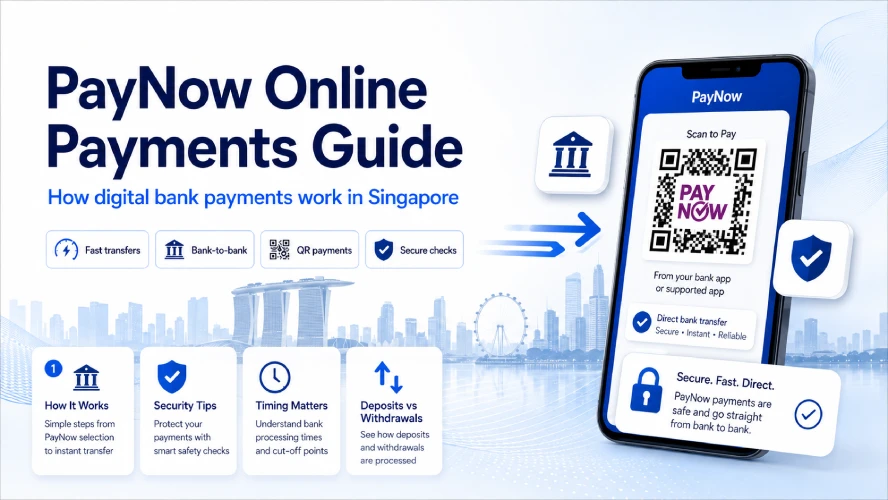
PayNow has become a familiar way to send and receive money in Singapore. Instead of entering a bank account number, users make payments through a participating bank or financial institution using identifiers such as a mobile number, UEN, Virtual Payment Address, or PayNow QR.
For online payments, the process is straightforward. You select PayNow, confirm the recipient and amount, then approve the transfer through your banking app. The payment itself is usually processed quickly, although the receiving website may need extra time to recognise or verify the transaction.
This PayNow online payments guide explains how the system works, how payments are processed, what security checks matter, and what to do when a transaction does not go as expected.
For a broader look at deposits, withdrawals, payment options, and gaming platforms, read our Online Casino Singapore guide.
Quick Answer
PayNow is a real-time payment service used in Singapore for transferring Singapore dollars between participating banks and financial institutions.
A typical PayNow online payment involves three steps:
- The merchant provides PayNow payment details or a QR code.
- You confirm the recipient and payment amount through your banking app.
- Your bank processes the transfer and sends the funds to the recipient.
PayNow payments are often completed quickly, but the receiving platform may take longer to update your account if it uses manual verification.
What Are PayNow Online Payments?
PayNow online payments are digital bank transfers completed through Singapore’s PayNow network.
Instead of asking users to enter full bank account details, PayNow supports identifiers such as:
- Mobile numbers
- NRIC or FIN
- UEN for businesses
- Virtual Payment Addresses
- PayNow QR codes
For online purchases, merchants commonly use PayNow QR or business payment information.
The main difference from a card payment is where the money comes from. PayNow generally transfers funds directly from your bank account rather than using a credit line or separate wallet balance.
For more background, read What Is PayNow and How Does It Work for Online Payments?
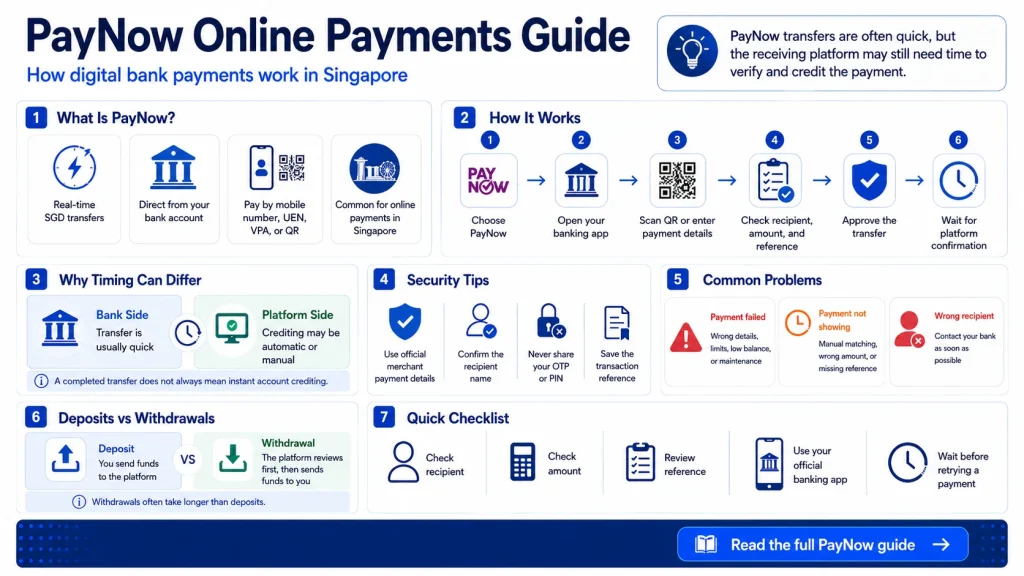
How PayNow Online Payments Work
The PayNow payment process is usually simple, but it involves both your bank and the receiving platform.
Step 1: Choose PayNow
Select PayNow from the merchant or platform’s available payment options.
You may be shown:
- A PayNow QR code
- A UEN
- A Virtual Payment Address
- Other payment details
Step 2: Open Your Banking App
Log in to your bank’s mobile application and open the PayNow or scan-to-pay function.
Step 3: Scan or Enter the Payment Details
Scan the QR code or enter the payment information provided by the recipient.
Step 4: Check the Recipient
Before authorising the payment, confirm:
- Recipient name
- Payment amount
- Reference number
- Transaction purpose, if displayed
This is one of the most useful checks because PayNow transfers are designed to move funds quickly.
Step 5: Approve the Transfer
Approve the transaction using the authentication method provided by your bank.
This might include:
- Biometric authentication
- Digital token
- Banking PIN
- Other bank security checks
Step 6: Wait for the Receiving Platform
Your bank may complete the transfer quickly, but the merchant or online platform still needs to recognise and credit the payment.
This is why a completed PayNow transaction does not always appear instantly in an online account.
PayNow Payment Process at a Glance
| Stage | What Happens | Possible Delay |
|---|---|---|
| Payment selected | User chooses PayNow | Usually none |
| Details confirmed | Recipient and amount checked | User input |
| Bank approval | Transaction authorised | Security check |
| Transfer processed | Funds move to recipient | Usually quick |
| Platform confirmation | Merchant matches the payment | Automated or manual review |
The payment network and the receiving platform are separate parts of the process. A fast transfer does not always mean instant account crediting.
How Fast Are PayNow Online Payments?
PayNow is built for real-time Singapore dollar transfers between participating financial institutions.
For many everyday payments, funds move quickly once the transaction is authorised.
The total time you experience depends on what happens after the transfer.
For example, an online platform may:
- Credit the payment automatically
- Match the payment using a reference number
- Ask for a receipt
- Review the transaction manually
Automated processing is usually faster because the platform does not need a staff member to verify the payment.
Read Instant PayNow Deposits vs Manual Transfers for a closer look at this difference.
PayNow Online Payments vs Other Methods
| Feature | PayNow | E-Wallet | Credit Card | Bank Transfer |
|---|---|---|---|---|
| Funding source | Bank account | Wallet or linked funding source | Credit line | Bank account |
| Payment speed | Usually fast | Usually fast | Usually fast | Varies |
| Extra account | No | Usually yes | Card required | No |
| QR payments | Yes | Often | Not usually | Depends |
| Credit involved | No | Usually no | Yes | No |
| Best suited to | Direct local payments | Digital spending | Card purchases | Account transfers |
PayNow often appeals to users who already rely on Singapore mobile banking and prefer direct account-to-account payments.
For a broader payment comparison, read Which Payment Method Is Fastest for Singapore Players?
Are PayNow Online Payments Secure?
PayNow payments are completed through participating financial institutions, so users benefit from the security controls built into their banking apps.
These often include:
- Authentication before payment
- Encrypted banking connections
- Transaction notifications
- Fraud monitoring
- Device-level security
The payment system is only one part of security, though. The recipient still matters.
Before approving a PayNow payment, check the recipient name and payment details carefully.
Read Is PayNow Safe for Online Casino Transactions? for more detail on PayNow security.
Tips for Secure PayNow Payments
A few habits reduce common payment mistakes.
Use the payment information displayed by the official merchant or platform. Avoid copying payment details from an unrelated message unless you have verified the sender.
Check the recipient before confirming every transaction.
Keep your banking login information private.
Do not share one-time passwords, banking PINs, or authentication codes.
Save your transaction reference if the merchant requires confirmation.
PayNow QR vs Manual Payment Details
Online merchants may support PayNow in two main ways.
PayNow QR
A PayNow QR code reduces the amount of information you need to enter manually.
You scan the code through your bank’s app, review the payment details, and approve the transaction.
This often lowers the risk of typing the wrong recipient information.
Manual PayNow Details
Some merchants provide a UEN, mobile number, or another supported payment identifier.
You enter the information manually and confirm the payment yourself.
This works well when QR payment is unavailable, but it requires extra care when checking the recipient.
What Are Common PayNow Payment Limits?
PayNow transaction limits depend on your bank, account type, and the settings you have chosen.
Possible limits include:
- Per-transaction limits
- Daily transfer limits
- Merchant payment limits
- Limits set by the receiving platform
Your bank may allow you to adjust certain transfer limits through its app.
The receiving platform may also impose its own minimum or maximum payment amount.
Always check both sides before sending a large transaction.
Why a PayNow Payment May Fail
A PayNow payment may fail for several reasons.
Common causes include:
- Incorrect payment details
- Insufficient account balance
- Bank transfer limits
- Recipient information no longer valid
- Banking system maintenance
- Security checks
- Platform payment restrictions
If the payment fails before money leaves your account, review the details and try again only after confirming the issue.
If money has already been transferred, avoid sending a second payment until you know what happened to the first one.
Why a PayNow Payment May Not Show Up
Sometimes the bank shows a completed PayNow transaction while the merchant account still shows no payment.
This often means the delay is happening on the receiving side rather than inside PayNow itself.
Possible reasons include:
- Manual payment matching
- Missing transaction reference
- Incorrect amount
- Account verification
- Payment processing queues
- Platform maintenance
Keep the transaction reference and payment confirmation. These details help the receiving platform trace the transfer.
Read Why Is My PayNow Deposit Not Showing? for a detailed troubleshooting guide.
Using PayNow for Online Casino Payments
Some online gaming platforms offer PayNow for deposits because it provides a direct local payment option for Singapore users.
The basic process is similar to other PayNow online payments:
- Select PayNow.
- Enter the deposit amount.
- Scan the PayNow QR or use the payment information.
- Confirm the recipient.
- Approve the payment.
- Wait for the platform to credit the balance.
The platform’s processing system determines how quickly the deposit appears after the bank transfer is completed.
Read How to Deposit Using PayNow at an Online Casino for the full process.
Frequently Asked Questions
How do PayNow online payments work?
You select PayNow, scan a QR code or enter the recipient information, confirm the payment details, and approve the transfer through your banking app.
Are PayNow online payments instant?
The bank transfer is often processed quickly. The receiving platform may take additional time to credit or verify the payment.
Is PayNow safe for online payments?
PayNow transactions use participating financial institutions’ security controls. Users should still verify the recipient before approving a payment.
Why did my PayNow payment fail?
Common causes include incorrect payment information, transfer limits, insufficient funds, security checks, or system maintenance.
What should I do if my PayNow payment is missing?
First check whether the bank shows the transfer as completed. Save the transaction reference and contact the receiving platform if the payment has not been credited after its stated processing time.