Skip to content
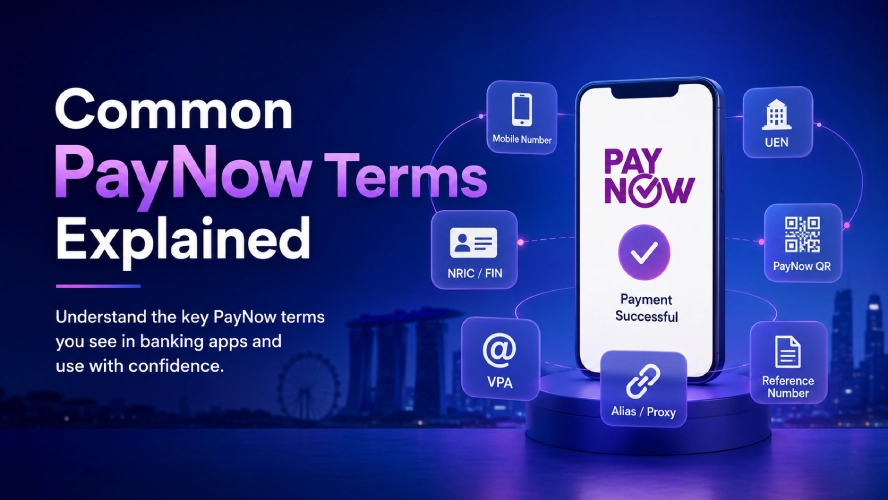
PayNow has become one of the most common ways to send and receive money in Singapore. Instead of entering a bank account number, you can transfer funds using a mobile number, NRIC, FIN, or a business UEN. Payments are processed through participating banks and usually arrive within seconds.
Whether you’re paying a friend, shopping online, settling a bill, or making payments to businesses, understanding how PayNow works helps you use it more confidently and avoid common mistakes.
Related Guide: Read our What Is PayNow and How Does It Work? guide to learn about the basics of Singapore’s PayNow system.
Why Understanding PayNow Terms Matters
Learning the terminology helps you:
- Choose the correct payment method.
- Understand what your banking app is asking for.
- Verify you’re paying the intended recipient.
- Reduce payment errors.
- Complete transactions with greater confidence.
For example, paying a friend usually requires a mobile number, while paying a business often requires a UEN or PayNow QR code.
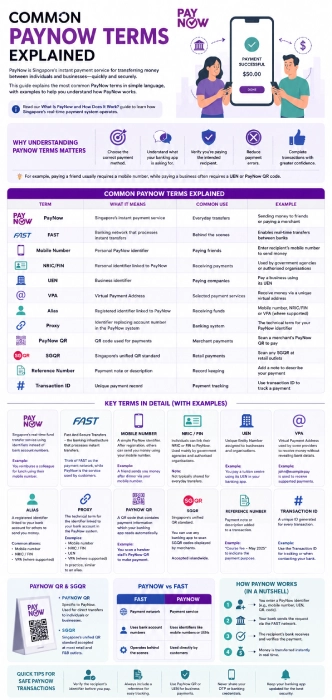
Common PayNow Terms Explained
| Term | What It Means | Common Use |
| PayNow | Singapore’s instant payment service | Everyday transfers |
| FAST | Banking network that processes instant transfers | Behind the scenes |
| Mobile Number | Personal PayNow identifier | Paying friends |
| NRIC/FIN | Personal identifier linked to PayNow | Receiving payments |
| UEN | Business identifier | Paying companies |
| VPA | Virtual Payment Address | Selected payment services |
| Alias | Registered identifier linked to PayNow | Receiving funds |
| Proxy | Identifier replacing account number | Banking system |
| PayNow QR | QR code used for payments | Merchant payments |
| SGQR | Singapore’s unified QR standard | Retail payments |
| Reference Number | Payment note or description | Record keeping |
| Transaction ID | Unique payment record | Payment tracking |
PayNow
PayNow is Singapore’s real-time fund transfer service that allows individuals and businesses to send and receive money without sharing bank account numbers.
Instead, payments are made using registered identifiers such as:
- Mobile number
- NRIC or FIN
- UEN
- PayNow QR
- Virtual Payment Address (where supported)
Example:
You reimburse a colleague for lunch by entering their mobile number instead of their bank account details.
FAST
FAST stands for Fast And Secure Transfers. It is the banking infrastructure that processes instant transfers between participating financial institutions.
Think of FAST as the payment network, while PayNow is the user-friendly service built on top of it.
PayNow vs FAST
| FAST | PayNow |
| Payment network | Payment service |
| Uses bank account numbers | Uses identifiers like mobile numbers or UENs |
| Operates behind the scenes | Used directly by customers |
Mobile Number
One of the simplest PayNow identifiers is your Singapore mobile number.
After registering for PayNow through your bank, people can transfer money directly to your mobile number without needing your account number.
Example:
A friend sends you money after dinner by selecting “PayNow via Mobile Number.”
NRIC or FIN
Individuals can link their NRIC or FIN to PayNow. Government agencies and authorised organisations often use this identifier when making eligible payments.
Users generally do not share their NRIC or FIN with others for everyday transfers.
UEN (Unique Entity Number)
A UEN is the official identification number assigned to businesses and organisations in Singapore. Many merchants display their UEN for PayNow payments.
Example:
You pay a tuition centre using its UEN entered in your banking app.
Virtual Payment Address (VPA)
A Virtual Payment Address (VPA) is a digital payment identifier used by some payment providers to receive money without revealing bank account details. Depending on the service, a VPA may resemble an email address or another unique identifier.
Unlike mobile numbers or UENs, VPAs are not commonly used for everyday PayNow transfers between individuals in Singapore. Most users are more likely to encounter mobile numbers, PayNow QR codes, or UENs when making payments.
Some financial institutions or specialised payment platforms support VPAs for specific payment services, allowing users to receive funds through a unique virtual address instead of sharing personal banking information.
Example:
A payment provider issues a VPA such as john@examplepay. Instead of sharing a bank account number, the user provides this VPA to receive supported payments.
Alias
An alias is a registered PayNow identifier that is linked to your bank account. It acts as an easier way for others to send you money without needing your account number.
Common PayNow aliases include:
- Mobile number
- NRIC or FIN
- Virtual Payment Address (where supported)
Instead of remembering your account number, people send money using your alias.
Proxy
A proxy is the technical banking term for the identifier linked to your bank account within the PayNow system. In practice, your proxy is simply the information people use to send you money.
Examples of PayNow proxies include:
- Mobile number
- NRIC or FIN
- UEN
- Virtual Payment Address (where supported)
Most banking apps rarely display the word “proxy” during everyday payments. Instead, the term is mainly used in bank documentation, customer support articles, and technical payment systems.
For most users, there is little difference between a proxy and an alias. Both refer to the registered identifier linked to a PayNow account.
Example:
If a bank support officer asks whether your PayNow proxy is registered correctly, they are referring to the mobile number, NRIC/FIN, or other identifier linked to your account.
PayNow QR
A PayNow QR code contains payment information that your banking app reads automatically. Instead of typing details manually, you simply scan the QR code.
Example:
A café displays a PayNow QR at the cashier. You scan it, confirm the amount, and complete payment within seconds.
SGQR
SGQR stands for Singapore Quick Response Code. It is Singapore’s national QR code standard that combines multiple payment methods into a single QR code. Many SGQR codes support PayNow alongside other payment services.
SGQR vs PayNow QR
| SGQR | PayNow QR |
| National QR standard | QR specifically for PayNow |
| May support several payment methods | Supports PayNow payments |
| Commonly used by merchants | Used wherever PayNow is accepted |
Linked Bank Account
Every PayNow identifier is connected to a bank account. Once money is sent successfully, the funds are deposited directly into the linked account. Users do not need to provide their account number during the transfer.
Reference Number
A reference number is a short description attached to a payment.
Examples include:
- Invoice 2026
- July Rent
- Lunch
- Membership Fee
Adding a reference makes transactions easier to identify later.
Recipient Verification
Before confirming a transfer, your banking app displays the recipient’s registered name. Always check this carefully before sending money. This verification step helps reduce accidental transfers.
Quick Tip
Before tapping “Confirm,” always verify:
- The recipient’s displayed name
- The mobile number, UEN, or QR code
- The payment amount
- The reference, if one is included
Taking a few seconds to review these details helps reduce accidental transfers and makes payment records easier to identify later.
Transaction ID
Every successful PayNow payment generates a unique transaction ID. This identifier helps banks investigate payment enquiries and allows users to locate specific transfers in their transaction history.
Where You'll See These Terms During a Payment

| Payment Step | Terms You’ll Encounter |
| Choose payment method | PayNow |
| Select recipient | Mobile Number, UEN, QR, VPA |
| Verify recipient | Recipient Name |
| Enter amount | Amount, Reference |
| Review payment | Confirmation Screen |
| Complete payment | Transaction ID |
Which PayNow Identifier Should You Use?
| Situation | Recommended Identifier |
| Paying a friend | Mobile Number |
| Paying a business | UEN |
| Paying in a shop | PayNow QR or SGQR |
| Paying an online merchant | PayNow QR |
| Receiving money | Registered Mobile Number or Alias |
Common Misunderstandings
Is PayNow the same as FAST?
No. FAST is the payment network, while PayNow is the payment service that uses FAST to transfer funds instantly.
Is SGQR the same as PayNow QR?
Not exactly. SGQR is a national QR standard that can support multiple payment methods, including PayNow. A PayNow QR is specifically designed for PayNow transactions.
Is UEN a bank account number?
No. A UEN identifies a registered business or organisation. It does not replace a bank account but is linked to one through PayNow.
Do I need to know someone's bank account number?
Usually not. If the recipient has registered PayNow, you can often pay using their mobile number, UEN, or PayNow QR.
Best Practices Before Sending Money
Following these simple steps helps reduce mistakes and makes payment tracking easier.
- Confirm the recipient’s name.
- Double-check the payment amount.
- Verify the UEN or mobile number.
- Read the payment reference carefully.
- Save the payment receipt for future reference.
Related Guides
Expand your understanding of PayNow with these resources:
Frequently Asked Questions
What is the most common PayNow identifier?
For individuals, the most common identifier is a registered Singapore mobile number. Businesses typically use a UEN or PayNow QR code.
What does UEN stand for?
UEN stands for Unique Entity Number, the official identification number assigned to registered businesses and organisations in Singapore.
What is the difference between SGQR and PayNow QR?
SGQR is Singapore’s unified QR standard that supports multiple payment methods, while a PayNow QR is specifically used for PayNow payments.
What is a PayNow alias?
A PayNow alias is a registered identifier linked to your bank account, such as your mobile number or NRIC/FIN, allowing others to send money without needing your account number.
Is PayNow safe to use?
PayNow includes recipient name verification and uses secure banking infrastructure. Users should still verify recipient details before confirming a transfer and follow good online security practices.