Skip to content
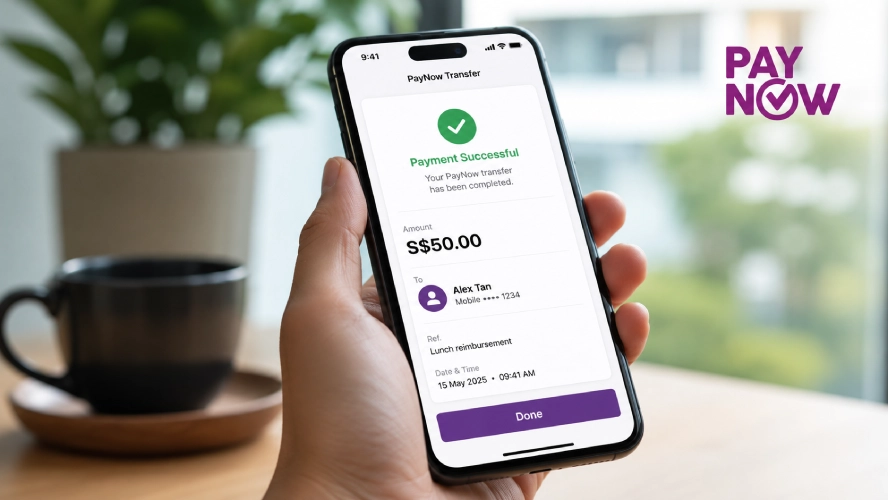
PayNow has become one of the most common ways to send and receive money in Singapore. Instead of entering a bank account number, you can transfer funds using a mobile number, NRIC, FIN, or a business UEN. Payments are processed through participating banks and usually arrive within seconds.
Whether you’re paying a friend, shopping online, settling a bill, or making payments to businesses, understanding how PayNow works helps you use it more confidently and avoid common mistakes.
Related Guide: Read our What Is PayNow and How Does It Work? guide to learn about the basics of Singapore’s PayNow system.
What Is PayNow?
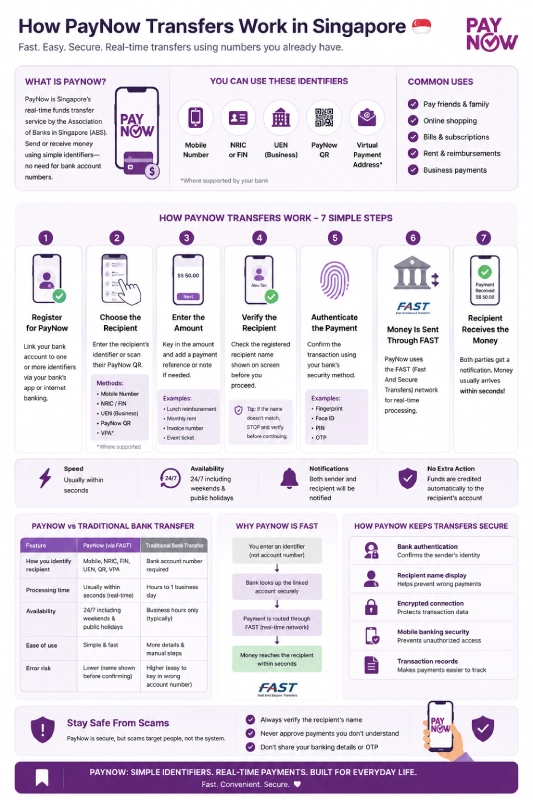
PayNow is Singapore’s real-time funds transfer service developed by the Association of Banks in Singapore (ABS). It allows individuals and businesses to send and receive money without sharing full bank account details.
Instead of asking for an account number, recipients simply share one of the following:
- Mobile number
- NRIC
- FIN
- Virtual Payment Address (VPA), where supported
- UEN (for businesses)
- PayNow QR code
Once an identifier is linked to a bank account, anyone using PayNow can transfer money directly.
How PayNow Transfers Work[

Although the process feels simple, several steps happen behind the scenes before the payment reaches the recipient.
Step 1: Register for PayNow
Before using PayNow, you must register through your bank’s mobile banking app or internet banking portal. During registration, you’ll link your bank account to one or more identifiers.
Common identifiers include:
- Mobile number
- NRIC
- FIN
- UEN (businesses)
Registration usually takes only a few minutes.
Step 2: Choose the Recipient
When sending money, you can identify the recipient in several ways.
| Payment Method | Description |
| Mobile Number | Most common for personal transfers |
| NRIC or FIN | Used when shared by the recipient |
| UEN | Used for business payments |
| PayNow QR | Scan a QR code instead of typing details |
Using PayNow QR reduces typing errors and speeds up payments.
Step 3: Enter the Amount
Enter the payment amount and, if needed, add a payment reference or note.
Examples include:
- Lunch reimbursement
- Monthly rent
- Invoice number
- Event ticket payment
This helps both parties identify the transaction later.
Step 4: Verify the Recipient
Before confirming, your banking app displays the registered recipient’s name.
Always check:
- Recipient’s name
- Amount
- Identifier used
For example, if you intended to pay “Alex Tan” but the banking app shows another name, stop and verify before proceeding.
This simple step helps prevent accidental transfers.
Step 5: Authenticate the Payment
Your bank asks you to confirm the transaction using its security measures.
Depending on your bank, this may include:
- Fingerprint authentication
- Face ID
- Banking PIN
- One-Time Password (OTP)
Only after successful authentication is the payment submitted.
Step 6: The Payment Is Processed
Once you confirm the payment, your bank processes the transaction through the PayNow service. For transfers between participating banks, PayNow uses Singapore’s FAST (Fast And Secure Transfers) network to move funds securely and in near real time. In most cases, the recipient receives the money within seconds.
Step 7: The Recipient Receives the Money
In most situations, both sender and recipient receive a notification confirming the payment. The funds usually appear in the recipient’s bank account within seconds. No additional action is required.
How Long Do PayNow Transfers Take?
PayNow transfers are designed to be processed in real time, with most payments reaching the recipient within a few seconds. The service is available 24 hours a day, including weekends and public holidays, making it suitable for everyday payments that require immediate confirmation. While delays are uncommon, transfers may take longer during scheduled bank maintenance or if there is a temporary technical issue with a participating bank.
Which Banks Support PayNow?
PayNow is supported by most major retail banks in Singapore, allowing customers to send and receive money seamlessly across participating financial institutions. Once your bank account is registered for PayNow, you can transfer funds to users at other participating banks without needing their bank account number. While the core PayNow service is widely available, certain features, such as business payments or QR payment options, may vary depending on the bank.
| Bank | Personal Accounts | Business Accounts |
| DBS / POSB | ✓ | ✓ |
| OCBC | ✓ | ✓ |
| UOB | ✓ | ✓ |
| Standard Chartered Singapore | ✓ | ✓ |
| HSBC Singapore | ✓ | ✓ |
| Maybank Singapore | ✓ | ✓ |
| CIMB Singapore | ✓ | ✓ |
Why PayNow Is Fast
Traditional bank transfers rely on account numbers and batch processing. PayNow removes several manual steps. Instead of entering lengthy banking details, the system looks up the linked identifier and routes the payment through FAST.
This allows:
- Faster payments
- Fewer typing mistakes
- Immediate confirmation
- Easier transfers between banks
How PayNow Keeps Transfers Secure
Security is built into every PayNow transaction. Banks use multiple security measures to verify users, protect payment data, and reduce the risk of unauthorized transactions. These safeguards work together in the background while keeping the payment process fast and convenient.
| Security Feature | Purpose |
| Bank authentication | Confirms the sender’s identity |
| Recipient name display | Helps prevent wrong payments |
| Encrypted banking connection | Protects transaction data |
| Mobile banking security | Prevents unauthorized access |
| Transaction records | Makes payments easier to track |
These security features help protect PayNow users, but they do not eliminate every risk. Most payment scams rely on tricking users into approving transactions rather than bypassing the banking system itself. Before confirming any payment, always verify the recipient’s name and details to reduce the chance of sending money to the wrong person or a scammer.
Common Reasons PayNow Transfers Fail
Although PayNow transfers are usually completed within seconds, there are situations where a payment cannot be processed successfully. Understanding the reason behind a failed transfer helps you resolve the issue more quickly.
| Problem | Possible Cause |
| Recipient not found | Recipient has not registered for PayNow |
| Daily transfer limit reached | Bank transfer limit exceeded |
| Authentication failed | Incorrect OTP or biometric verification |
| Banking maintenance | Temporary service interruption |
| Internet connection lost | Transaction not completed |
If a payment fails, check your banking app for the specific error message before attempting another transfer.
What Happens If You Send Money to the Wrong Person?
PayNow transfers are generally irreversible once completed. If you accidentally send money to the wrong recipient:
- Contact your bank immediately.
- Record the transaction reference.
- Inform the bank of the incorrect recipient.
- Wait for the bank’s investigation.
Banks can contact the recipient, but they cannot automatically reverse a completed transfer without the recipient’s cooperation.
For this reason, always verify the recipient’s displayed name before confirming payment.
Tips Before Sending a PayNow Transfer

Following a simple checklist reduces the chance of mistakes. Before every transfer:
- Confirm the recipient’s name.
- Double-check the payment amount.
- Verify the mobile number or identifier.
- Avoid making payments through suspicious links.
- Save the transaction receipt.
- Never rush because someone pressures you to pay immediately.
Developing these habits helps keep your payments secure.
When Is PayNow a Good Choice?
PayNow is a practical payment method for everyday transactions that require fast and direct bank transfers. Because payments are processed in real time, it is suitable for both personal transfers and payments to participating businesses. Its simple payment process also removes the need to exchange bank account numbers in many situations.
Common examples include:
- Paying friends after a meal
- Splitting household expenses
- Paying small businesses
- Shopping online
- Receiving freelance payments
- Paying service providers
- Sending money to family members
Many online platforms also accept PayNow as a payment method because it offers quick confirmation and direct bank transfers.
Frequently Asked Questions
Do I need the recipient's bank account number?
No. You only need a registered PayNow identifier such as a mobile number, NRIC, FIN, UEN, or a PayNow QR code.
Are PayNow transfers free?
Most personal PayNow transfers between participating banks are free, although business pricing may differ depending on the bank and service.
Is there a daily PayNow transfer limit?
Yes. Daily PayNow transfer limits are determined by each participating bank. Depending on your bank, you may be able to view or adjust your transfer limit through online or mobile banking. Check your bank’s latest policy for the applicable limits.
Can businesses receive PayNow payments?
Yes. Businesses can register using their UEN and receive payments directly into their business bank accounts.
Is PayNow safe?
PayNow uses bank-level security, encrypted connections, and authentication measures. Users should still verify recipient details and remain alert to scams.
Can I cancel a PayNow transfer?
Once a PayNow transfer has been successfully processed, it usually cannot be cancelled. Contact your bank immediately if you believe you sent money to the wrong recipient.
Can I use PayNow to send money overseas?
No. PayNow is designed for domestic transfers between participating financial institutions in Singapore. If you need to send money internationally, you will need to use a separate overseas remittance or international money transfer service.
Will I receive proof of payment?
Yes. Once a PayNow transfer is completed, your banking app usually generates a transaction confirmation or digital receipt. This record includes details such as the payment amount, recipient, date, time, and transaction reference number.
Does the recipient need to register for PayNow?
Yes. To receive payments through a PayNow identifier such as a mobile number, NRIC, FIN, or UEN, the recipient must first register that identifier with a participating bank. If they have not registered, the transfer cannot be completed using that identifier.
Learn More About PayNow
If you’re researching payment methods for online gaming, you can also explore our PayNow Casino Singapore guide for an overview of how PayNow is commonly used on supported.
Sources
This article is based on information published by Singapore’s official payment authorities and participating financial institutions, including:
- Association of Banks in Singapore (ABS): https://www.abs.org.sg/consumer-banking/pay-now
- Monetary Authority of Singapore (MAS): https://www.mas.gov.sg
- DBS Bank PayNow: https://www.dbs.com.sg/personal/support/bank-paynow.html
- OCBC PayNow: https://www.ocbc.com/personal-banking/digital-banking/paynow
- UOB PayNow: https://www.uob.com.sg/personal/save/everyday-accounts/paynow.page
- HSBC Singapore PayNow: https://www.hsbc.com.sg/help/paynow/
- Standard Chartered Singapore PayNow: https://www.sc.com/sg/bank-with-us/paynow/